
Why can’t I hear audio or video on TheBulwark.com in my browser?
If your computer's volume is turned up but you still can’t hear a Bulwark video or podcast, check the player’s own volume control. It works separately from your computer’s volume and may be muted or turned down.
Check the player’s volume- Move your mouse over the player to reveal its controls.
- Find the speaker icon and the volume bar beside it.
- If an “X” appears beside the speaker, click the speaker icon to unmute it.
- Click near the far right end of the volume bar to turn up the player’s sound, then try playing again.
The player can be turned down almost to zero without being muted. In that case, you won’t see an “X,” but the volume bar will look nearly empty and you may hear nothing. This is easy to miss, even when your computer’s volume is turned all the way up.
In this instance, the web player is not muted but the volume bar to the right of the highlighted red box is effectively muted.
At full player volume, the bar is filled all the way to the right. Sound waves beside the speaker indicate that the player is unmuted, but do not necessarily mean it is at full volume.
Here, the volume bar, which you can see with a white line, is about 80% volume.
Check whether your browser has muted the tab or website itself.
Right-click the tab at the top of your browser. If you see an option such as Unmute / Mute Tab or Unmute / Mute Site, select it and try playing again. The wording varies by browser.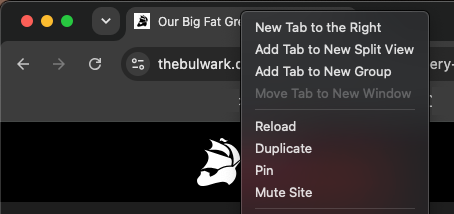
Still need help?
Email members@thebulwark.com and include:
- Which browser you’re using, such as Safari, Chrome, or Firefox.
- A link to the video or podcast you’re trying to play.
- Whether sound works on other websites.
- Screenshots, if you know how to do them.