
What is this app?
This is The Bulwark’s first standalone app. It’s designed to make reading, listening, and
watching Bulwark content easier on your phone.
The app was designed with members in mind and includes new features to enhance your
subscriber experience:
● Read to me - listen to articles on the go
● Save articles or shows for later
● A “For You” feed where you can follow what you love
● Audio-only versions of all our shows
● Resize text
● Switch to dark mode
● Dedicated Read tab
● Dedicated Watch & Listen tab
This is version 1.0. It will improve.
FAQ:
-
Do I need a Bulwark+ subscription to use the app?
You can download and browse the app for free. For unfettered access to our content, you’ll
need an active, paid Bulwark+ subscription. Log in with the same email address you use on
thebulwark.com which is hosted on Substack.
If you do not know what email address you used to sign up, search your inbox for newsletters,
alerts or messages from The Bulwark. Use the address from anything that is getting PAID
content from us.
-
Will installing this app impact my other Bulwark notifications?
OFF. You can control this via your mobile device settings for the App.
Our editors will curate a limited daily selection of App Alerts to let you know when new content is available.
Bulwark App Alerts are separate from your Bulwark+ email preferences or Substack App
Notifications settings.
-
Is this the same as the Substack App?
No, the Substack App is a separate mobile app featuring all of your Substack hosted
subscriptions, the Notes feed, livestreams and live chat all in one place.
TheBulwark.com and Bulwark+ are hosted on Substack. The Bulwark App is powered by
Substack but only contains Bulwark content. Your Bulwark+/Substack profile grants you access to Bulwark content in any of these spaces.
-
Will I see or hear ads?
If you are a paid Bulwark+ member and are logged in, you should not. The only time you
theoretically might hear an ad on the app is if you watch a live show as it is happening. (We edit
out the ad and upload an ad-free version after, so if you want to completely avoid ads, wait until the event is over.)
-
Can I subscribe inside the app?
Subscriptions are handled through Substack on the web. Click here to join, and here to access
your account page.
-
What content can I access?
Articles, podcasts, and video content. Only recent work will be in this app. If you’re doing a deep dive or research, use the TheBulwark.com.
-
Does the app support comments?
Yes! If you are logged in, you should be able to comment and reply to others. This app will not
notify you of replies.
-
Can I listen offline?
Yes, you can listen to and download audio of our shows. Due to file sizes, video downloads are not offered at this time.
Download the episode while you’re connected to the internet, and you can listen without a connection later.
To download:
1. Go to the Podcast tab.
2. Select the show and episode you want. (This downloads the audio file to your device’s storage, inside the app’s sandbox, not in your audio files.)
3. Tap the cloud icon with the downward arrow next to the play button. It is on the far left of the player bar at the bottom.

Once downloaded, the episode will play offline.
Alternatively, if you’re going on a flight and want to download a few episodes, the best way is to add them to your audio queue and to download them using the downward facing download icon
on the right.
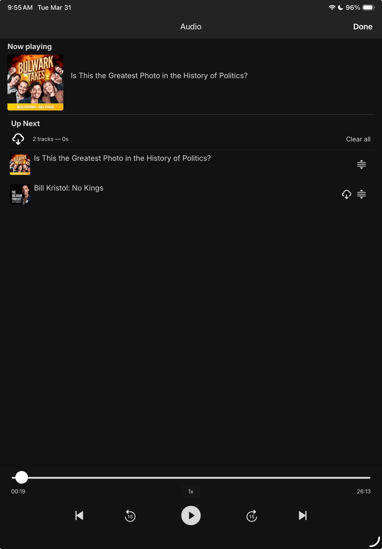
Note: Offline listening applies to downloaded podcast episodes only. Video and other content require an internet connection.
-
Are there transcripts?
Not yet. We are working on it! In the meantime, you can access transcripts below any video on
TheBulwark.com.
-
Does the App work on TV?
The Bulwark App is a mobile device app for your smart phone or Ipad. You can cast video from
the App to your phone/iPad to your smartTV.
If you have a smartTV hooked up to Apple TVs set top box or powered by Google.
Why does the app feel simpler than other news apps?
Because we designed it that way.
Version 1.0 is about stability, clarity, and access, not bells and whistles. We’d rather ship
something solid and improve it than promise everything on day one. But the goal is to be
simpler and less confusing so you can get to what you want to read or watch quickly and without
hassle.
-
Help! I can't find the app in the app store!
It’s possible that your device’s operating system has reached the end of its supported life. If you have a pending upgrade, completing that will usually fix it. If you can’t, the app may rely on
system processes that were introduced after Apple or Google stopped supporting that OS
version. Unfortunately, on older devices, that’s not something we’re able to fix on our end. To
access the app, you’ll need a newer device if yours cannot upgrade beyond the current
operating system. Sorry!
-
Something isn’t working. What should I do?
First: make sure you’re logged in with the same email address you use for your Bulwark
subscription. Then, in the app, use the app's report an issue feature to send us a brief description of what is going wrong (and the logs.)
To do this: In The Bulwark app, click the settings sprocket in the upper right hand corner. Once on the settings page, select "Report an issue" near the bottom. This will open your email client with the attached logs. Those logs help us identify the source of the problem.
We read those emails, and they directly inform what we fix next.